Illustrator Scripts I Use in Production
Four Illustrator scripts I use to turn copied HEX colors into swatches and gradients, or apply editable shear and rotation.
I originally made these four Illustrator scripts for my own production work. They aren’t trying to be beautiful pieces of code. Function over form - they do the job, It-Works(TM).
All four have been tested with Illustrator CC and up. I put them on GitHub hoping someone else might find them useful too.
HEX colors into a swatch group
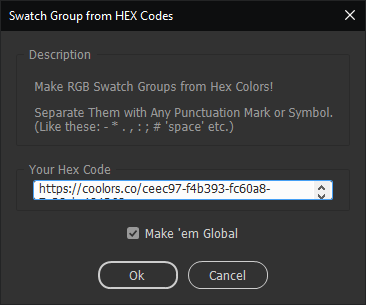
addSwatchGroup.jsx takes a block of text containing six-digit HEX values and turns every color it finds into an Illustrator swatch group. The values can be separated by spaces, punctuation, or pretty much any other symbol, so there is no need to clean up the text first.
It works with palette links from Coolors, CSS copied from Adobe Color, or any other text containing HEX codes. Paste it into the dialog and the script does the rest.
There is also a Make 'em Global checkbox. It is on by default because you should use global swatches anyway. Each swatch is named from its RGB values, and duplicate names are handled automatically so Illustrator doesn’t freak out.
For the even quicker version, quickAddSwatchGroup.jsx reads the copied text directly from the clipboard and creates the swatch group without opening the dialog.
Copied colors into a gradient
quickAddGradient.jsx uses the same clipboard approach. Copy text containing a series of HEX colors, run the script, and Illustrator creates a linear gradient with evenly distributed stops.
I wrote it primarily for CSS copied from the Learn UI Gradient Generator. It reads the colors, not the CSS angle, so you still have to set the gradient direction in Illustrator.
Editable shear and rotate
I found the original shear script on the internet. It applies shear through Illustrator’s Transform effect instead of directly distorting the selected artwork, so the result stays editable in the Appearance panel.
My shearNrotate.jsx version translates the interface from Japanese to English and adds a checkbox to rotate the selected objects by the shear angle. Most of the time I rotate them anyway, so now the script can do both at once.
Get the scripts
The complete set is available in the Illustrator Scripts repository on GitHub. Use them, share them, enjoy them. Just don’t resell them.